
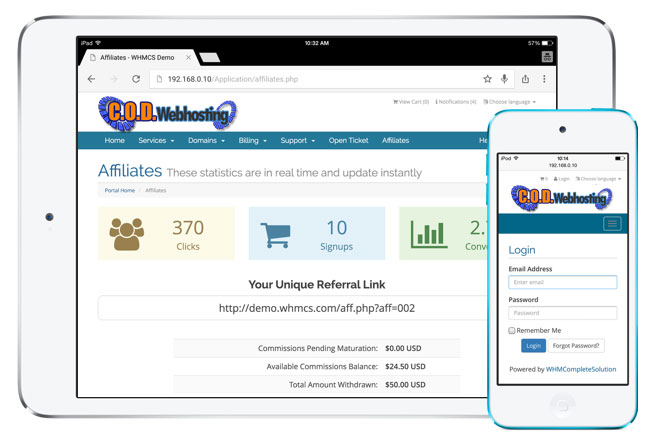
One of the biggest new features of our Client Billing Software Version 6.0 is the brand new client area. This has been completely redesigned and re-written to give you the best possible experience. You may have already had a sneak peek of it if you have visited your client area, if not then read on for details of how it will benefit you…
Author: Joe DiFiglia
-

Heartbleed Vulnerability
As many of you may have read, there is a vulnerability in the open source software used for encrypting websites, OpenSSL. Unfortunately, many sites are affected by this vulnerability and are working incredibly hard to patch the affected software. The vulnerability leaves masses of people at risk of having their passwords revealed. Although many banks and other financial institutions may not be affected, many people use the same passwords for many different sites. One site may reveal your password to another.
The Heartbleed Bug
The Heartbleed Bug is a serious vulnerability in the popular OpenSSL cryptographic software library. This weakness allows stealing the information protected, under normal conditions, by the SSL/TLS encryption used to secure the Internet. SSL/TLS provides communication security and privacy over the Internet for applications such as web, email, instant messaging (IM) and some virtual private networks (VPNs).
The Heartbleed bug allows anyone on the Internet to read the memory of the systems protected by the vulnerable versions of the OpenSSL software. This compromises the secret keys used to identify the service providers and to encrypt the traffic, the names and passwords of the users and the actual content. This allows attackers to eavesdrop on communications, steal data directly from the services and users and to impersonate services and users.
If you are worried that sites you have visited may have exposed your passwords, you simply cannot just go and change your passwords. If you change your password on a site that has not patched OpenSSL, you are just exposing another password. Until the system administrators catch up, we are all exposed.
We have worked hard to patch all of our servers and can report to you that none of them are affected by this vulnerability. The proof is in the pudding… visit this website to see for yourself.
http://filippo.io/Heartbleed/#codwebhosting.com
If you have any concerns or questions, please feel free to reach out to us.
-

Enjoy MarketGoo
Now available from your hosting control panel, MarketGoo!

MarketGoo is the easiest and most effective website marketing toolset. It allows you to submit your website to Google with an efficient and modern methodology and guide you through the different areas of website marketing to help you achieve success. Start receiving more qualified visits by improving your SEO, Social Media, Link Building and Monitoring with MarketGoo tools.
Why use MarketGoo?
Appear on Google
MarketGoo search engine submission tool will help you appear on Google thanks to its modern submission technology.Receive more qualified visits
Select and promote the keywords that better represent your business to receive more qualified visits. The more targeted your actions are, more easily these visits will transform into customers.Measure your success
With MarketGoo you will be able to track the search engine positions and traffic of your keywords, as well as many more metrics to help you measure your improvements.Beat your competitors
Benchmark your website marketing activities and results against those of your competitors and steal business from them. MarketGoo will help you in detecting the biggest opportunities in this area.How does it work?
MarketGoo unique technology will analyze your website regularly and adapt more than 200 actions and recommendations specific to your website and industry. This way, you can be sure that every single task that you complete on MarketGoo is driving you closer to online success.
Benefits
MarketGoo consists of different set of tools:
- Free SEO Starter Pack: Search Engine submission, website health audit, SEO and linkbuilding analysis
- Optimize Website: Make your site rank higher in search engines by optimizing its structure and content to promote the keywords that are relevant to your business
- Increase Visibility: Get more links from relevant pages and receive more qualified visits
- Improve Social Media: Develop a Social Media strategy that connects with your customers and translates into higher visibility and sales
- Analyze Competitors: Learn how your competitors are performing on their website marketing and adapt your strategy to beat them
- Monitor Results: Track and analyze your website marketing evolution and identify the key aspects that are bringing the highest benefits to your business
-
Price drop on TLDs
We have dropped the prices on our TLDs! New pricing is as follows:
TLD Min. Years Register Transfer Renew .com 1 $15.36 USD $15.36 USD $15.36 USD .net 1 $15.36 USD $15.36 USD $15.36 USD .org 1 $15.36 USD $15.36 USD $15.36 USD .biz 1 $15.36 USD $15.36 USD $15.36 USD .info 1 $15.36 USD $15.36 USD $15.36 USD .us 1 $15.36 USD $15.36 USD $15.36 USD .me 1 $28.95 USD $28.95 USD $28.95 USD .asia 1 $28.95 USD $28.95 USD $28.95 USD .co.uk 1 $15.36 USD $15.36 USD $15.36 USD .eu 1 $28.95 USD $28.95 USD $28.95 USD .name 1 $28.95 USD $28.95 USD $28.95 USD -
cPanel – Your Hosting Control Panel
What is cPanel?
 cPanel is a graphical web-based control panel that helps you quickly and easily manage your website and hosting account. cPanel gives you complete control over a vast amount of functions, streamlining useful processes such as:
- Creating databases
- Managing website files
- Setting up email accounts & auto responders
cPanel has grown to become the most popular web hosting control panel, running millions of websites around the world. cPanel was created to give server and website owners control over their properties. Whether you’re managing one, or hundreds, of servers and/or websites, cPanel’s user friendly point-and-click interface allows you to customize your web hosting experience to fit your needs.
Creating Accounts
Web site owners can use cPanel to create email accounts, available through the standard protocols including POP, IMAP, and SMTP, all with or without SSL encryption. cPanel also supports Push Email via IMAP IDLE, enabling fast incoming and outgoing mail delivery designed with mobile users in mind.
Webmail Access
cPanel provides several web-based interfaces for checking email, including Horde, Roundcube, and SquirrelMail. You have the ability to access your email from any web browser, as well as configure many account options including email forwarding and auto-responders.
Spam
To help curb spam, cPanel gives you the option of using powerful spam filters, SpamAssassin, and BoxTrapper. These powerful utilities analyze your incoming mail, looking at the source and content of the message, as well as comparing it against lists of known spammers. You can also setup spam filter rules which route messages to a spam folder, helping to keep your inbox uncluttered at all times.
Email Forwarding
cPanel users can set up email forwarding which allows account holders to have an address at one domain (such as [email protected]) and forward incoming messages to another (such as [email protected]).
Email Filtering
For power users, mail filtering is available for improved organization and handling of incoming mail, as well as a mailing list function to enable your users to engage in discussions via email.
Backups
Backing up data is simple with cPanel’s “Backup Wizard.” With a few clicks, cPanel will make a full backup of your databases, email, and web sites, which you can download to your computer or send to another server over SCP or FTP.
Databases
cPanel makes it easy to manage databases. All of your database tasks, ranging from creating databases to manually editing tables, can be done through cPanel. As a standard, cPanel supports MySQL databases, with the ability to add PostgreSQL as well.
Easy Setup Wizard
To minimize setup time, cPanel includes a “Getting Started Wizard,” which will walk you through the initial configuration of your account. Step-by-step tutorials, on-screen documentation, and other useful information is available through the Wizard.
Manage Domain Names
While most Web site owners manage only one domain for their Webhosting account, there are many others who use a combination of domains. Through cPanel, you have the ability to manage:
- Subdomains are your domain (example.com), with a prefix (sub.example.com).
- Parked Domains are additional addresses that point to the website.
- Add-on domains are addresses that can point to a specific section of your hosting, allowing you to run several Web sites from your account.
Managing Files
With cPanel, you have several options for managing your website content.
- Easily upload and manage web pages in cPanel’s File Manager
- Drag and drop files into your account using cPanel’s Web Disk feature
- Utilize traditional file transfer methods (including FTP, SFTP, and FTPS).
- In addition to offering various file management tools, cPanel & WHM makes it easy to manage FTP accounts for employees or colleagues, enabling other users to upload files with optional security restrictions.
One-Click Applications
With a few clicks, you can install commonly used web-based applications, such as WordPress blogs, simply by answering a few quick questions through your cPanel interface. cPanel’s intuitive and highly customizable interface will provide you with an environment that will grow and evolve as your needs change.
Account Statistics
cPanel offers a range of built-in log file statistics. Through log processing programs such as Webalizer, Analog Stats, and AWStats, you can see how many times your websites have been visited and how much email you’ve been sending.
-
New Site Design
Welcome to the new design for C.O.D. Webhosting. We have been hard at work and the new site design is refreshing and clean.
